
Shared storage is the infrastructure layer that makes modern web hosting — including VPS hosting, dedicated servers, and cloud environments — reliable, scalable, and fault-tolerant. Understanding how it works helps you make smarter decisions when choosing hosting for your business.
Explore our web hosting plans in Ghana — built on enterprise shared storage infrastructure.
What Is Shared Storage?
Shared storage is a pool of disk capacity that resides on a specialised device or network of devices — accessible by multiple servers simultaneously over a high-speed network. Unlike a hard drive attached to a single machine, shared storage means that any server on the network can read from and write to the same underlying data.
This is the foundation of virtualised hosting environments. Without shared storage, virtual machines (VMs) would be locked to a single physical server — making migration, failover, and redundancy far more difficult to achieve.
Shared storage typically takes one of two forms: a NAS (Network Attached Storage) or a SAN (Storage Area Network).
NAS vs SAN: What’s the Difference?
Both NAS and SAN provide networked, multi-server storage — but they differ significantly in architecture, cost, and use case.
NAS (Network Attached Storage)
A NAS is traditionally a single device — often purpose-built with embedded hardware and no screen or keyboard — that provides file-level storage over a standard network. Multiple users and servers access a NAS using protocols like NFS (Network File System) or CIFS/SMB (Common Internet File System / Server Message Block).
Key characteristics of NAS:
- File-level storage (the NAS manages the file system)
- Accessible over a standard Ethernet network
- Suitable for file sharing, backups, and moderate workloads
- Capacity is limited to what fits in a single device
- Lower cost than SAN at entry level
A NAS is well-suited to environments where simplicity and cost matter more than raw performance.
SAN (Storage Area Network)
A SAN is a dedicated, high-speed network of storage devices — typically interconnected over Fibre Channel or iSCSI — that presents storage to servers at the block level. Rather than sharing a file system, a SAN presents raw disk volumes (called LUNs, or Logical Unit Numbers) that the server mounts and manages as if they were a locally attached drive.
Key characteristics of SAN:
- Block-level storage (the server manages its own file system on the LUN)
- Connected via high-speed Fibre Channel or iSCSI fabric
- Always runs RAID (Redundant Array of Independent Disks) for data protection
- Supports multiple servers accessing shared storage simultaneously
- Historically expensive — in 2006, a 4 TB enterprise SAN could cost upwards of $60,000 USD
- Far lower latency than NAS for I/O-intensive workloads
The critical operational advantage of a SAN is that a mounted LUN behaves identically to a local disk from the server’s perspective — with none of the file-system overhead of NAS.
NAS vs SAN: Quick Comparison
| Feature | NAS | SAN |
|---|---|---|
| Storage type | File-level | Block-level |
| Protocol | NFS, CIFS/SMB | iSCSI, Fibre Channel |
| Typical use | File sharing, backups | Virtualisation, databases |
| Cost | Lower | Higher |
| Latency | Higher | Lower |
| Scalability | Single device (traditionally) | Multiple linked devices |
| RAID | Optional | Always |
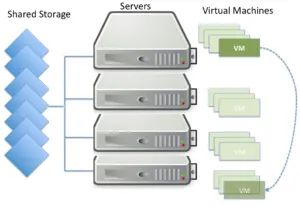
Who Actually “Shares” Shared Storage?
This is a common point of confusion. The “shared” in shared storage does not refer to different customers sharing each other’s data. It refers to servers sharing access to the same storage pool.
In a virtualised hosting environment, multiple physical servers — each running as a hypervisor or host — all connect to the same shared storage backend. Each hypervisor runs multiple virtual machines (VMs). Because every hypervisor can read and write to the same storage, the VMs stored on that shared pool are not tied to any single physical machine.
This architecture unlocks several critical capabilities:
VM Live Migration
A VM can be moved from one physical host to another — while it is still running — without any downtime. Because the VM’s disk data lives on shared storage rather than on the host’s local disk, the migration only needs to transfer the running state of the VM, not its entire disk image.
Failover
Failover is the automatic process of restarting VMs on a healthy host when their original host fails or requires maintenance. Failover may involve a short window of downtime — typically seconds to minutes — while the VM is restarted. Without shared storage, failover would require copying large disk images across the network first, making it impractically slow.
High Availability (HA)
High Availability is a stricter form of failover. HA systems are designed to detect failure and resume operations within seconds — often imperceptible to end users. HA depends entirely on shared storage: the surviving hosts must be able to immediately access the failed host’s VM disks without any data transfer step.
If you run a business-critical website or application, the underlying HA infrastructure of your hosting provider is what prevents unexpected outages from affecting your users. This is one reason why managed VPS hosting and dedicated servers with enterprise-grade infrastructure provide stronger uptime guarantees than basic shared plans.
How Shared Storage Has Evolved
The SAN technology described above — Fibre Channel fabrics, proprietary SCSI drives, six-figure price tags — defined enterprise storage for most of the 2000s. That landscape has changed significantly.
Modern shared storage options include:
Software-Defined Storage (SDS): Platforms like Ceph, GlusterFS, and VMware vSAN distribute storage across commodity hardware, eliminating the need for a dedicated SAN appliance. The intelligence moves from the hardware into software running on standard servers.
NVMe over Fabrics (NVMe-oF): Extends the ultra-low-latency NVMe interface across a network, combining the performance of local NVMe SSDs with the multi-server accessibility of a SAN.
Hyperconverged Infrastructure (HCI): Collapses compute, networking, and storage into a single layer of standard server nodes. Each node contributes local storage to a shared pool managed by software. This is how most modern cloud providers — and many hosting companies — build their infrastructure today.
Object Storage: Services like Amazon S3 popularised object storage, which treats data as discrete objects rather than files or blocks. Object storage scales horizontally to petabytes and is used for backups, media, and static assets.
For a deeper look at how virtualisation and storage models intersect, see our virtualisation storage models architecture guide.
What Does This Mean for Your Hosting?
If you are an end user on a shared hosting plan or WordPress hosting, shared storage is entirely invisible to you — and that is the point. It operates below the level you interact with, managed by the hosting provider’s infrastructure team.
Where it becomes relevant to your decision-making:
Uptime and reliability. A hosting provider running shared storage with HA clustering can recover from a physical server failure without you losing access to your website. Providers without this infrastructure cannot offer the same guarantees.
Scalability. Because VMs live on shared storage, a good hosting provider can scale your resources — RAM, CPU, disk — without migrating data or taking your server offline.
Backup and snapshots. Shared storage platforms support VM snapshots, which allow a point-in-time copy of an entire server’s disk state. This is the infrastructure layer that makes automated website backups fast and reliable.
If you are considering upgrading from shared hosting to a VPS, understanding this infrastructure layer helps clarify what you are actually buying — and why some VPS plans are faster, more resilient, and more expensive than others.
RAID: The Data Protection Layer Inside Shared Storage
Every enterprise shared storage system — NAS or SAN — runs RAID. RAID (Redundant Array of Independent Disks) distributes data across multiple physical drives so that the failure of one or more drives does not cause data loss.
Common RAID levels used in hosting infrastructure:
RAID 1 (Mirroring): Data is written identically to two drives. If one fails, the other has a complete copy. Simple and reliable, but doubles the storage cost.
RAID 5: Data and parity information are striped across three or more drives. Can survive one drive failure. Efficient use of capacity but slow to rebuild after a failure.
RAID 6: Like RAID 5 but with double parity — survives two simultaneous drive failures. More commonly used in large storage arrays.
RAID 10 (1+0): Combines mirroring and striping. High performance and strong redundancy, but requires at least four drives and uses 50% of raw capacity.
For a detailed breakdown of RAID configurations used in server environments, see RAID explained and RAID continued.
Shared Storage in the Context of Hosting Types
Understanding shared storage clarifies the differences between hosting types:
| Hosting Type | Storage Architecture | VM Migration | High Availability |
|---|---|---|---|
| Shared hosting | Shared SAN/NAS (provider-managed) | N/A | Provider-level |
| VPS hosting | Shared storage, isolated VM per customer | Yes | Depends on plan |
| Dedicated server | Local disks or SAN-attached | Manual only | Optional add-on |
| Cloud hosting | Distributed object/block storage | Yes | Built-in |
For a practical comparison of what each hosting type means for your website, see:
- VPS vs shared hosting — which do you need?
- Web hosting vs cloud hosting
- What is dedicated web hosting?
- VPS vs VDS vs dedicated servers
This Article Is Part of the Virtual Hosting Concepts Series
This post is one part of a three-part series on the infrastructure behind virtualised web hosting:
- Virtual Hosting Concepts — Multi-Tenanting — how multiple customers share physical servers safely
- Virtual Hosting Concepts — Shared Storage (this article) — how servers share the same disk infrastructure
- Virtual Hosting Concepts — Resources — how CPU, RAM, and I/O are allocated and protected in a virtualised environment
Frequently Asked Questions
What is shared storage in web hosting? Shared storage in web hosting is a centralised pool of disk capacity — hosted on a SAN or NAS device — that multiple physical servers can access simultaneously over a network. It enables virtual machine migration, failover, and high availability without transferring large disk images between servers.
What is the difference between a NAS and a SAN? A NAS (Network Attached Storage) provides file-level storage over a standard network using protocols like NFS or SMB. A SAN (Storage Area Network) provides block-level storage over a high-speed fabric such as Fibre Channel or iSCSI. Block-level storage behaves like a locally attached drive to the server, making it faster and better suited to virtualisation and database workloads.
Does shared storage mean other users can access my data? No. “Shared” refers to multiple servers sharing access to the same storage hardware — not to different customers sharing each other’s data. Customer data is isolated at the hypervisor and file-system level regardless of the shared storage backend.
What is high availability in hosting? High availability (HA) is a configuration where virtual machines are automatically restarted on a healthy server within seconds of a host failure. HA depends on shared storage — because the VM’s disk is accessible from any host in the cluster, the surviving hosts can immediately boot the affected VMs without copying data first.
What is a LUN in storage? A LUN (Logical Unit Number) is a block storage volume presented by a SAN to a server. From the server’s perspective, a LUN appears and behaves identically to a locally attached hard drive — the server formats it, creates a file system on it, and uses it just like internal storage.
Do I need shared storage for my website? No — as an end user, shared storage is managed entirely by your hosting provider. What matters to you is whether your provider’s infrastructure includes HA clustering and redundant storage, which directly affects your uptime guarantees. Check for this when evaluating VPS and dedicated server plans.
Ready to move to infrastructure that takes storage seriously? Compare Linux VPS plans, managed VPS hosting, and dedicated servers — or start with web hosting in Ghana if you’re just getting started.

Happy Hosting!