You can achieve virtually anything on a Linux operating system using a command. Whether you want to send a file to the printer, set up your system firewall, or edit a file without even opening it; you can do it all directly from the terminal. Don't forget to read out grep command in Linux. There're thousands of Linux commands available on any Linux system and more handed to you whenever you install new software or packages. It’s a common misconception amongst beginners that you have to cram all of these commands in order to be considered an expert, but in reality, you only need to know a small subset of commands to become a proficient Linux administrator. In this article, we'll be sharing 100+ such commands across different categories along with a downloadable Linux commands cheat sheet. View our Linux server offers.
Basic Commands
| Command | Description |
|---|
ls
|
Show all files and directories present in the working directory |
ls -l
|
Show all files and directories along with details like ownership, size, and when they were last modified |
ls -t
|
Sort the output of ls by last modified date |
pwd
|
List the path of the current working directory |
cd directory
|
Switch to a different working directory |
cd ..
|
Move up one directory level |
cd /
|
Switch to the root directory |
clear
|
Wipe out all the text from the terminal screen |
history
|
Print out all the previously executed commands in the current session |
touch filename
|
Create a new file |
vi filename
|
Open a file for editing |
cat filename
|
Display the contents of a file |
hostnamectl
|
List system information, including kernel, release, architecture, and virtualization etc. |
ifconfig
|
Show the network interfaces, IP addresses, and MAC address of the system |
date
|
Print the current system date and time |
top
|
List all the running processes on the system |
free -m
|
Show memory usage stats |
head filename
|
Display the first 10 lines of a file |
tail filename
|
Display the last 10 lines of a file |
mv file /new/file/path
|
Move the file to a different location |
mv filename new_filename
|
Rename a file |
cp filename new_filename
|
Copy a file |
man command_name
|
List helpful information regarding a command |
rm filename
|
Delete a file |
rm –rf directory_name
|
Remove a directory and its contents |
sudo
|
For regular users to run commands with elevated privileges |
mkdir directory_name
|
Create a new directory |
kill pid
|
Kill a process using its process ID |
reboot
|
Restart the system |
shutdown –h now
|
Turn off the system |
Networking Commands
| Command | Description |
|---|
dig domain_name
|
Show the DNS related information of the given domain name |
dig -x host
|
Perform a reverse lookup for a host |
host domain_name
|
Perform DNS lookup of the given domain name which prints out the IP address |
whois domain_name
|
For more information about a domain |
ping ip
|
Check the connectivity between your host and the given IP address |
ssh username@ip
|
To securely log in as the specified user on another server |
wget file
|
Download a file |
wget -c file
|
Continue a stopped download |
traceroute domain_name
|
Trace the route a packet will take when travelling from your machine to a host |
telnet domain_name port
|
Connect to a remote host on a specific port |
netstat –pnltu
|
Display all currently listening ports |
route
|
Display the routing table for your machine |
arp
|
View the contents of the ARP (address resolution protocol) table |
cat /etc/resolv.conf
|
See the DNS servers that your machine is currently using |
tcpdump -i eth1 'port 80'
|
Log and monitor all incoming traffic on port 80 |
nmap ip
|
Network discovery of the given IP. Find out whether the host is up, which ports are open etc. |
Search Commands
| Command | Description |
|---|
locate keyword
|
Search for a file or directory in a pre-compiled cache. Much faster than find but many not show all results |
find keyword
|
Search for a file or directory in the real system. Much slower than locate but is always up-to-date |
find /home -name *.ext
|
Search for the given extension in the /home directory and all its sub-directories |
find / -type f ! -perm xxx
|
List all files that don’t have the specified permission |
find / -perm /u=r
|
Display all the read-only files |
grep keyword filename
|
Search for the specified keyword/pattern in the given file |
grep keyword *
|
Search for the specified keyword/pattern across all files in the current directory |
grep -i keyword *
|
To ignore case while searching |
grep -r keyword *
|
Perform a recursive search, i.e. include the sub-directories in the search |
grep -x 'what to match' *
|
Print all the lines where a match was found |
grep -c keyword *
|
Count the number of matches |
Permissions Commands
| Command | Description |
|---|
chmod xxx filename
|
Assign the specified permissions to a file |
chmod –R xxx directory
|
Assign the specified permissions to a directory, and all its sub-directories |
chmod –x filename
|
Remove the execution permissions from a file |
chown username filename
|
Change the ownership of the specified file |
chown username:groupname filename
|
Change the ownership and the group ownership of a file |
chown username:groupname filename1 filename2 filename3
|
Change the ownership and the group ownership of multiple files |
chown --from=bob alice filename
|
Change the ownership of a file only if it’s owned by a specific user (added after --from=) |
chown -h usergroup symbolic_link
|
Forcefully change the owner and group of a symbolic link |
Storage Commands
| Command | Description |
|---|
df –h
|
List storage related information of all partitions, including overall size, free space, and used space etc. |
mount
unmount
|
Mount or unmount an ISO file or a storage device |
du -h /home/directory_name
|
Find the directory size in a human readable format |
du -sh /home/directory_name
|
To get the total size of a directory |
du -ah --exclude='*.xxx' /home/directory_name
|
Display the disk usage of all files in a directory, excluding files with the given extension |
du -ha --time /home/directory_name
|
Display disk usage of a directory by modification time |
fdisk -l
|
Show disk size along with partitioning information |
sudo du -x / | sort -nr | head -20
|
List the top 20 directories that are overconsuming resources |
User Management Commands
| Command | Description |
|---|
adduser username
|
Add a new user |
userdel -r 'username'
|
Delete a user |
passwd -l 'username'
|
Change the password of a user |
whoami
|
See the currently logged in user |
usermod -c 'This user will be deleted tomorrow' username
|
To add a comment to a user account |
cat /etc/passwd
|
Display a list of all users with additional info |
usermod -d /home/test username
|
Change the home directory of a user |
sudo deluser username group_name
|
Remove a user from a group |
usermod -a -G group_name username
|
Add a user to a group |
groupadd group_name
|
Create a new group |
groupdel group_name
|
Delete a group |
id
|
Display the user ID, group ID, and groups for the current user |
Archive Commands
| Command | Description |
|---|
tar -cvf archive.tar filename.txt
|
Compress a file into a tar archive |
tar -tvf archive.tar
|
Display the contents of a tar archive |
tar -xvf archive.tar filename.txt
|
Extract a single file out of a tar archive |
zip archive.zip file1.txt file2.html file3.jpg
|
Create a zip archive using multiple files |
zip -u archive.zip filename.txt
|
Add a file to an already zipped file |
zip -d archive.zip filename.txt
|
Delete a file from a zip archive |
unzip archive.zip
|
Unzip a zip archive |
unzip archive.zip -d /directory_name
|
Unzip a zip archive to a specific directory |
tar xf archive
|
Extract archive of any type |
gzip filename
|
Compress a file and add the .gz extension to it. This will delete the original file |
gzip -c filename > archive.gz
|
Create a new compressed .gz file, preserving the original |
Advanced Commands
| Command | Description |
|---|
ps –ef | grep process_name
|
Check whether a specific process is running |
netstat –pnltu | grep port
|
Check whether a specific port is open |
history | grep keyword
|
Search for something in the history |
ip r
|
Display the IP address of the default gateway |
ssh-keygen
|
Generate SSH keys to allow public key based secure login |
scp filename user@ip:/home/location
|
Securely copy a file to a remote host |
find / -type f -perm 777 -print -exec chmod xxx {} \;
|
Find all the files that have 777 permissions, and modify them to xxx |
sed -i 's/CONTENT_TO_REPLACE/CONTENT_TO_REPLACE_IT_WITH/g' filename
|
Replace the specified content in a file with something else |
tcpdump -nnvvS src SRC_IP and dst port xxxx
|
Monitor all traffic emerging from a certain IP and going towards a certain port |
traceroute domain_name -q 5
|
Send 5 packets per hop while tracing the route to the given domain name |
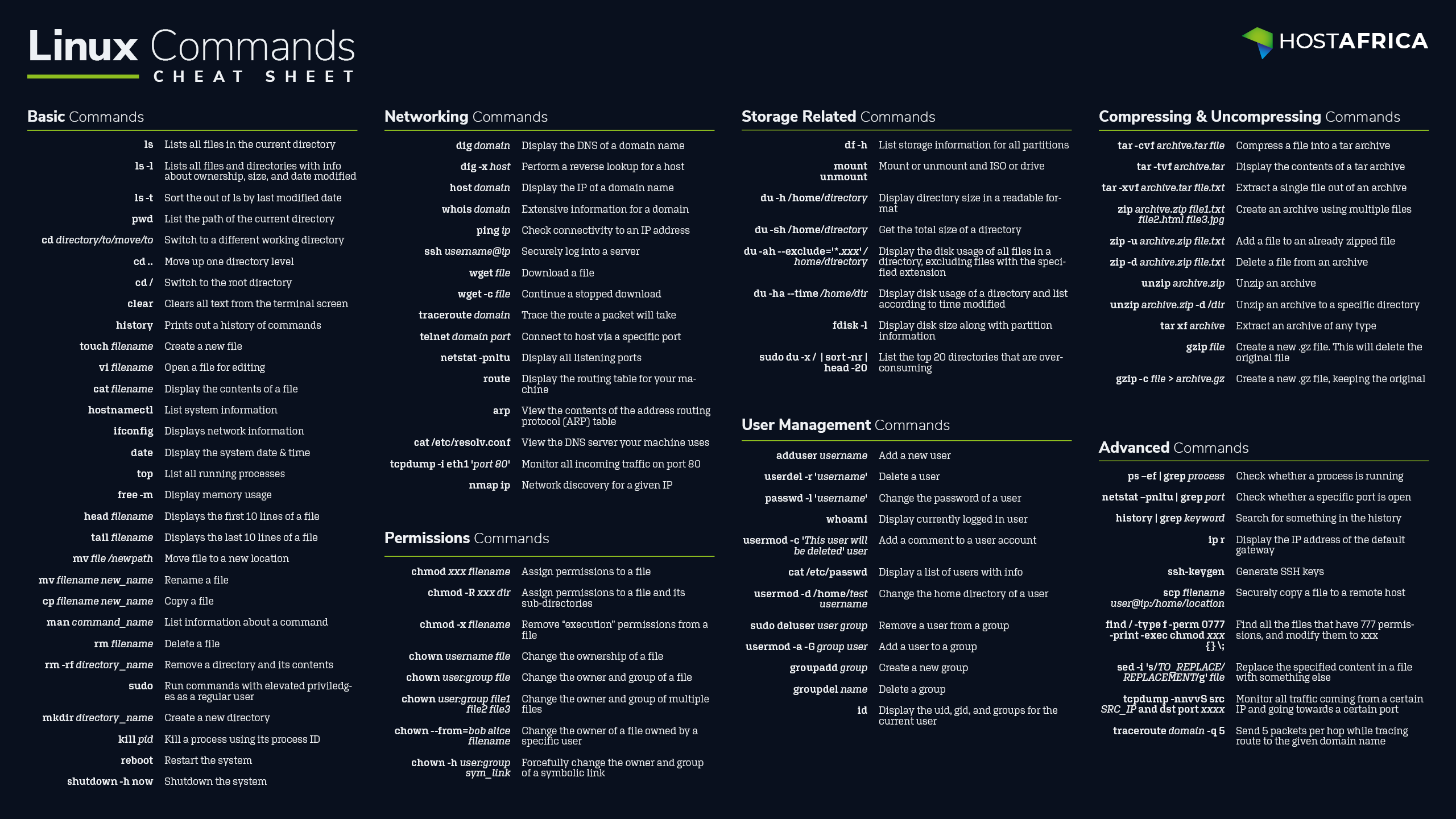
Downloadable Linux Commands Cheat Sheet
Download the 2560x1440 wallpaper cheat sheet for easy reference.
Download the Cheat Sheet