Imagine a customer in Kumasi spotting a boutique's new collection on Instagram.
They tap the website link, but the page takes forever to load. The images appear slowly, the screen freezes, and the customer gives up.
That's a potential sale lost before they even see your products.
If you've been wondering, "Why is my website slow?", you're not alone.
The good news? You don't always need expensive upgrades or a developer to fix it.
In this guide, you'll learn how to find the cause in about five minutes and what to do next.
Key Takeaways: Why Is My Website Slow?
- Most slow websites have large images, too many plugins, or missing caching. Hosting isn't always the problem.
- Google PageSpeed Insights is a free tool that helps you identify what's slowing your website down.
- A slow server response time can indicate a hosting problem.
- Website speed matters for mobile visitors, and Google's Core Web Vitals contribute to page experience signals.
- If your hosting is the problem, faster hosting or a VPS may help.
Why Website Speed Matters for Ghanaian Businesses
Your website might look great, but customers won't appreciate it if they're waiting too long for pages to load.
Many customers in Ghana browse using mobile data from MTN, Telecel, or AT. Connections can also vary depending on their location.
A website filled with large images and unnecessary features takes longer to load and uses more data.
For an online shop, that could mean abandoned shopping carts. For a restaurant, it could mean customers leaving before viewing the menu.
Website speed also matters for search results.
Google uses Core Web Vitals as part of its page experience signals. These measure how quickly content appears, how responsive a page feels, and whether elements move unexpectedly.
However, speed alone doesn't determine your Google rankings.
A faster website improves the user experience and makes it easier for customers to browse, enquire, and buy.
How to Check Your Website Speed in Five Minutes
Before spending money on upgrades, find out what's causing the problem.
Google offers a free tool called PageSpeed Insights.
Here's how to use it:
- Open Google PageSpeed Insights.
- Enter your website address.
- Click Analyse.
- Check the mobile results first.
- Review the performance score and recommendations.
You'll see a score out of 100, along with information about your website's performance.
Pay attention to three things.
- Largest Contentful Paint (LCP): This measures how long the largest visible content element, such as a main image or heading, takes to appear. Google considers 2.5 seconds or less good.
- Server response time: This tells you how quickly your hosting server begins responding. A slow response can indicate server problems, although other factors may contribute.
- Recommendations: These highlight performance issues, such as oversized images, unused JavaScript, or missing caching.
You may also see Core Web Vitals results based on real visitors, if Google has enough data.
Don't worry about understanding every technical term. Focus on the problems the report identifies.
Why Is My Website Slow? The Most Common Causes
There are several reasons your website might be loading slowly. Fortunately, many are easy to fix.
- Large, high-resolution images: Uploading full-size photos from your phone or camera can slow down your website, especially for customers browsing on mobile data.
- Too many plugins or a heavy theme: Unnecessary WordPress plugins and complicated themes can affect website performance.
- Missing caching: Without caching, browsers and servers may need to reload website files repeatedly, increasing loading times.
- Too many external scripts: Chat widgets, tracking tools, pop-ups, and social media features can slow down your website.
- Slow or overloaded hosting: If your server lacks enough resources, your website may struggle during busy periods.
Hosting location can also affect response times. Read our guide on Local vs International Web Hosting: Which Is Right for You? to understand the difference.
Website Speed Diagnosis: Match the Problem to the Fix
Use this table alongside your PageSpeed Insights report.
| What you notice | Likely cause | What to do |
|---|---|---|
| Large images flagged | Oversized photos | Compress and resize images |
| Slow LCP | Heavy images or slow server | Optimise images, then check server response |
| Slow server response | Hosting or server issues | Investigate hosting performance |
| Cache warnings | Missing caching | Enable caching |
| Unused JavaScript | Extra plugins or scripts | Remove unnecessary features |
| Slow during busy periods | Resource limits | Consider faster hosting |
A slow LCP result doesn't automatically mean your hosting is bad. Check the other recommendations before making changes.
How to Fix a Slow Website Yourself
You don't need advanced technical skills to improve website speed.
Start with these simple fixes:
- Compress your images: Resize and compress photos before uploading them. Use formats like WebP to reduce file sizes without significantly affecting quality.
- Enable caching: If you're using WordPress, consider a caching plugin like LiteSpeed Cache on compatible servers to improve loading speeds.
- Remove unnecessary plugins: Delete plugins you no longer use and avoid overlapping features. Back up your website before making major changes.
- Choose a lighter theme: Avoid complicated themes with excessive animations, sliders, and features that slow down your website.
- Remove unnecessary widgets: Keep only essential pop-ups, chat tools, and tracking scripts that add value to your website.
- Test after every change: Run Google PageSpeed Insights again to see which improvements worked before spending money on additional fixes.
When Your Hosting Is the Problem
Sometimes, optimising images and removing plugins isn't enough.
Your hosting may be the issue if every page loads slowly, server response times remain high, or your website struggles during busy periods.
You might also notice resource-limit errors.
When this happens, consider hosting that better matches your website's needs.
| Your website needs | Hosting option |
|---|---|
| Faster business website or blog | LiteSpeed Hosting |
| WordPress website or online shop | WordPress or WooCommerce Hosting |
| Busy shop or booking system | Managed VPS |
| Full server control for technical users | Linux VPS |
For most small businesses, LiteSpeed Hosting is a practical starting point. Plans start from ₵70/month.
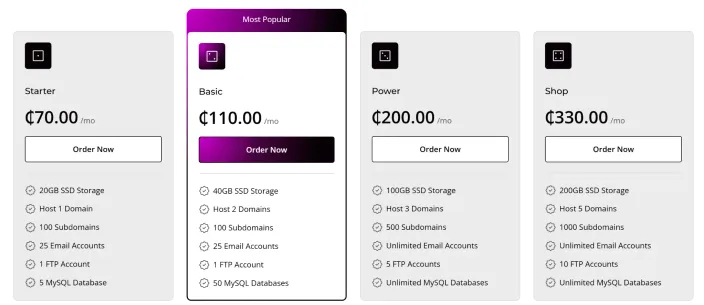
If your website runs on WordPress, consider WordPress Hosting or WooCommerce Hosting for online shops.
For busier websites that have outgrown shared hosting, Managed VPS starts from ₵860/month.
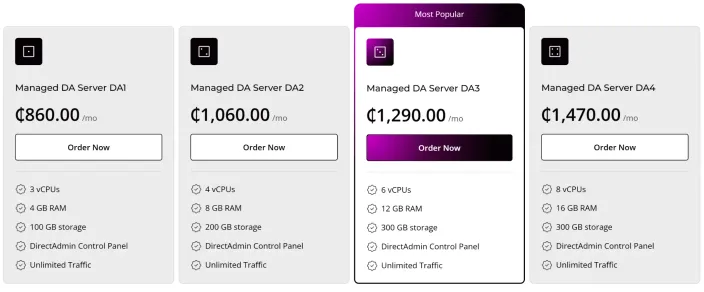
HostAfrica handles server management, while technical users can consider Linux VPS from ₵72/month.
HostAfrica's Ghana servers are located in Accra. Free migrations are also available for eligible hosting plans through its website migration service.
Common Mistakes When Fixing Website Speed
Avoid these mistakes when troubleshooting a slow website:
- Upgrading too early: Check the cause before spending more on hosting.
- Installing more plugins: Extra plugins can sometimes create additional problems.
- Uploading oversized photos: Resize images before adding them to your website.
- Testing only on office Wi-Fi: Check how your website performs on mobile data too.
- Chasing a perfect score: Focus on a fast, usable website rather than achieving 100/100.
The goal is to make your website better for real customers.
FAQs: Website Loading Slowly
Why Is My Website Slow?
Large images, unnecessary plugins, missing caching, and slow hosting are common causes. Run Google PageSpeed Insights to identify potential problems.
How Do I Check My Website Speed?
Visit Google PageSpeed Insights, enter your website address, and review the mobile performance report. It's free.
What Is a Good Server Response Time?
For Time to First Byte (TTFB), a commonly used measure of initial response time, 800 milliseconds or less is considered good by Google's web performance guidance. Lower is generally better, but the result depends on several factors.
Does Hosting Affect Website Speed?
Yes. Hosting resources, server configuration, and location can affect loading times. However, website optimisation is equally important.
Will a Faster Website Improve My Google Rankings?
Better Core Web Vitals can support Google's page experience signals, but rankings also depend on content relevance, quality, and other factors.
When Should I Upgrade to a VPS?
Consider a VPS when your website consistently reaches resource limits, slows during busy periods, or needs more server resources than shared hosting provides.
Stop Guessing. Find Out Why Your Website Is Slow.
A slow website doesn't always need expensive fixes.
Start with Google PageSpeed Insights. Check your images, plugins, caching, and server response times.
Fix the simple problems first, then test again.
If hosting is holding your website back, explore HostAfrica's LiteSpeed Hosting for faster, optimised hosting in Ghana.
Running a busy online shop or booking system? Managed VPS Hosting offers more resources as your business grows.