TL;DL: Summary
- Hbuild lets users build a full website just by describing their business
- No coding, no design skills, no technical setup required
- AI creates structure, content, and layout instantly
- Users can easily edit, style, and launch their site in minutes
- Perfect for small businesses, freelancers, and side hustles
For many small businesses in Ghana, the idea of building a website still feels overwhelming. People know they need one, but the moment words like “WordPress” or “plugins” come up, they get discouraged. They expect it to be expensive, technical, and time-consuming.
This is exactly the problem Hbuild by HostAfrica was built to solve.
Why Hbuild is perfect for beginners
Hbuild is an AI-powered website builder that allows someone to create, customize, and launch a professional website simply by describing their business in plain English. No coding. No design experience. No complicated setup. Just a guided, visual process that makes sense even to someone building their first website.
For affiliates, this is important. You are helping someone in Ghana take their first real step online, quickly and confidently.
How to set up
To understand how simple this really is, let’s look at what the experience actually looks like when someone starts building their website.
Step 1: Describe the business and let the AI do the work
When someone opens Hbuild, the message is very clear and very reassuring. The page says, “Your Business Deserves a Website That Works”, followed by a simple instruction: “Describe what you do, our AI will build a high-converting website in minutes.”
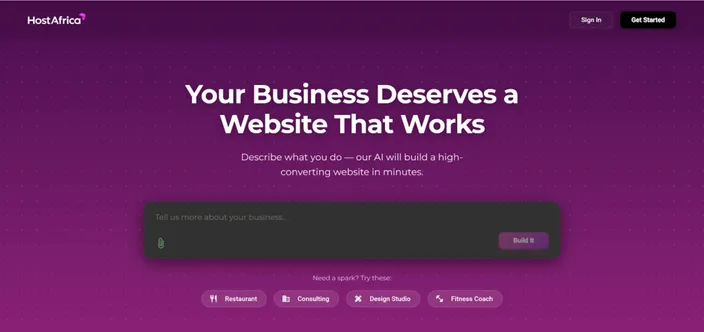
There is no pressure to choose templates or layouts upfront. This immediately lowers the barrier for people who are not tech-savvy, which is very common among small businesses, sole traders, freelancers, and side hustles across Ghana.
To help users get started, Hbuild also shows example business types like Restaurant, Consulting, Design Studio, and Fitness Coach. These examples remove hesitation and help users start with confidence, even if they have never built a website before.
Step 2: Use a natural prompt
The screenshot below shows a simple prompt like: “I have a restaurant. Help me build a website for it.” This is important because it shows how Hbuild is meant to be used. There is no technical language, no layout instructions, and no feature selection. Just a normal sentence written the way someone would speak.
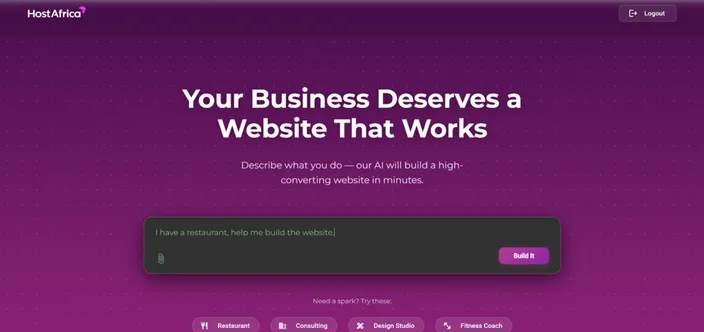
The AI then decides what sections, content, and structure make sense for that type of business. This approach works perfectly for Ghanaian entrepreneurs who want results without stress or technical confusion.
Step 3: The Page Builder opens with a complete website already in place
After clicking Build It, the user is taken straight into the Page Builder. In the restaurant example shown in the screenshots, the site already includes a hero section with a headline, supporting text, buttons, and imagery. Below that are clearly defined sections such as features, gallery, opening hours, and contact information. Nothing feels unfinished or confusing.
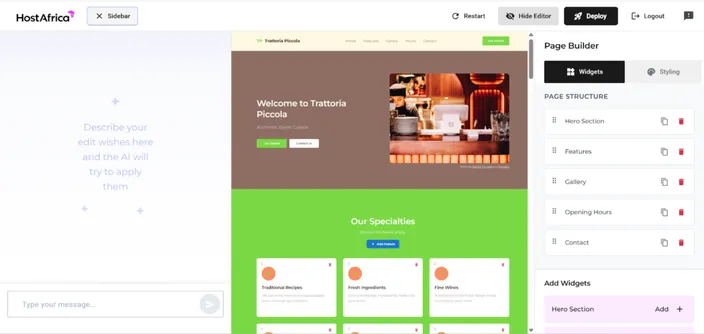
At the top of the editor, there are clear action buttons like Restart, Hide Editor, and Deploy, giving users confidence that they can either make changes or move forward when ready.
Step 4: Edit the structure of the site using Widgets
On the right-hand side of the Page Builder, the Widgets tab is selected by default. Under this tab, the user sees a section called Page Structure. This is a visual list of all the sections that make up the website. Sections like Hero Section, Features, Gallery, Opening Hours, and Contact can be reordered, duplicated, or deleted using simple icons.
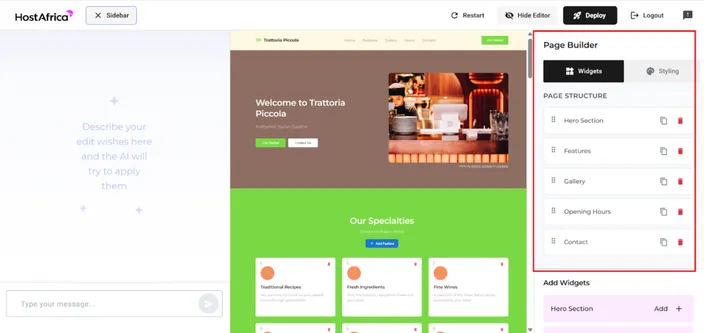
Instead of dealing with code or complicated menus, users simply move sections up or down to change the flow of the page. This is ideal for Ghanaian small business owners who want control without technical complexity.
Step 5: Add new sections using the “Add Widgets” panel
Below the Page Structure, the Add Widgets area allows users to add more sections to their website. Available sections include Testimonials, About Us, Services, Gallery, Contact, and Opening Hours, each with a clear Add + button.
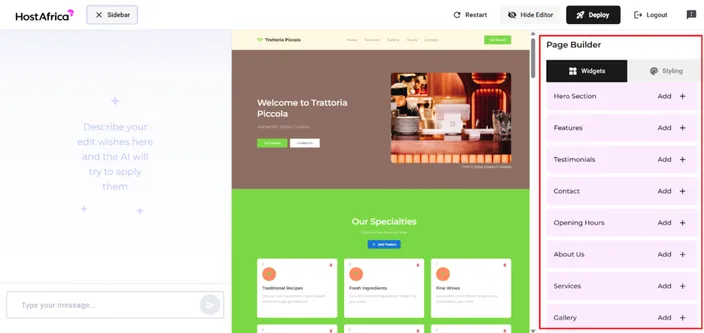
This means users are never stuck with the first version of their website. They can expand and improve it at any time without breaking the design or layout.
Step 6: Change the look and feel using Global Styling
Once the structure is in place, users can switch from Widgets to Styling.This opens the Global Styling panel, where users control the overall look of the website. From the screenshot, the main options are Colors, Fonts, and Spacing. Changes made here apply to the entire website automatically.
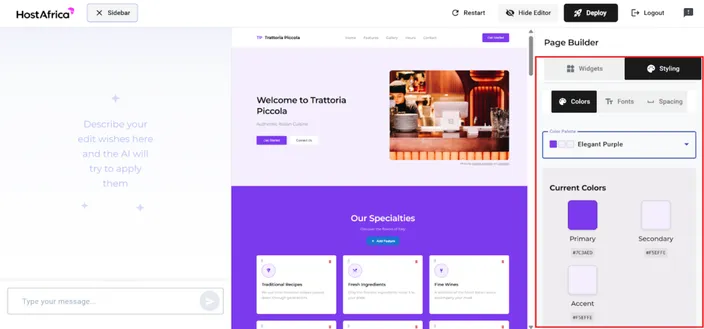
The example colour palette, Warm Earth, includes clearly labelled primary and secondary colours. Even users with no design background can create a clean, professional look. This is a big advantage for Ghanaian businesses that want to look credible online without hiring a designer.
Step 7: Ask the AI to make changes using plain language
Hbuild also includes a text box where users can ask the AI to make changes for them. For example:
- “Make the headline more professional”
- “Add a stronger call to action”
- “Rewrite this to sound more friendly”
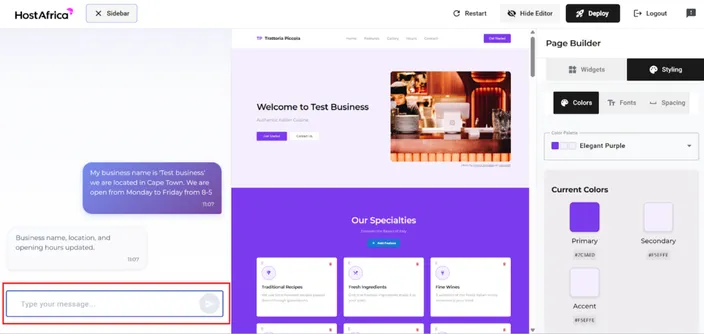
The AI attempts to apply these changes automatically, helping users improve their website without struggling over wording or structure. This is especially useful for first-time website owners who are unsure how to present their business online.
Step 8: Deploy the website in a few clicks
When the website is ready, the user clicks Deploy, which opens a clear deployment popup.
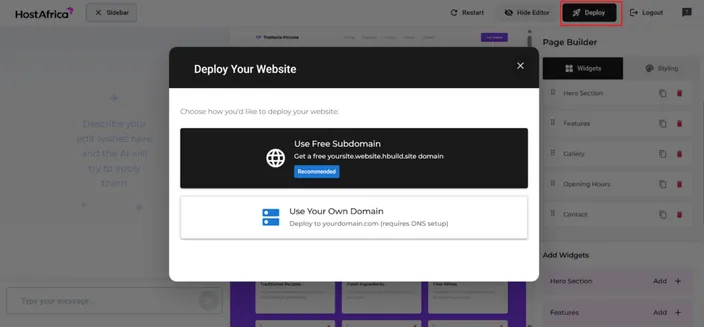
There are two deployment options:
The first option is to use a free Hbuild subdomain, which allows someone to go live immediately. This is ideal for testing, early launches, or new businesses.
The second option is to deploy the website on a custom domain, which is the natural next step for Ghanaian businesses that want a professional online presence.
For affiliates, this is where .com.gh domain sales and long-term value come into play.
Share feedback directly from the builder
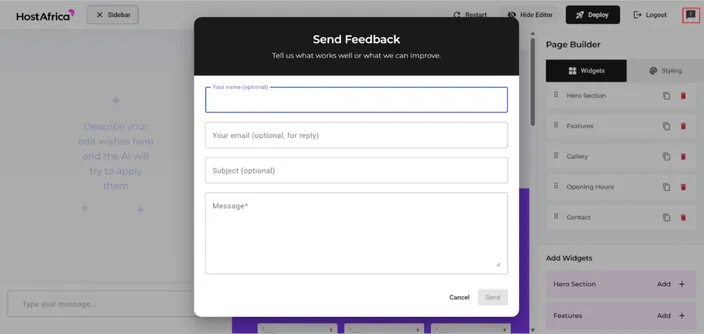
The final screenshot shows a Send Feedback form built directly into Hbuild. Users can submit comments or suggestions without leaving the platform. This shows that Hbuild is actively improving and listening to users, which builds trust in the product.
Why Hbuild Is a Big Opportunity for HostAfrica Affiliates in Ghana
- Hbuild is easy to explain and easy to sell, no web design or technical skills required
- Users simply describe their business, and the AI builds the website for them
- Well-suited for Ghanaian small businesses, freelancers, and side hustles
- Fits naturally after domain purchase, solves “how do I build my website?” instantly
- Helps affiliates turn interest into immediate action
- Offers a strong side-hustle opportunity for affiliates (website setup services)
- Affiliates can charge a once-off setup fee in addition to earning commission
- AI handles structure, content, and layout, you guide and make small edits
- Full website can be built and launched in under an hour
- One client can lead to repeat work, upgrades, and ongoing income
Ready to Get Started With Hbuild?
If you’ve been waiting for the right moment to help someone in Ghana get a website online, this is it. Hbuild makes website creation simple, fast, and accessible, while giving you the opportunity to earn by helping others move forward. Start by showing your audience how easy it is to describe their business and let the AI build the website.
👉 Try Hbuild today, build a website in minutes, and turn simple conversations into real earnings.